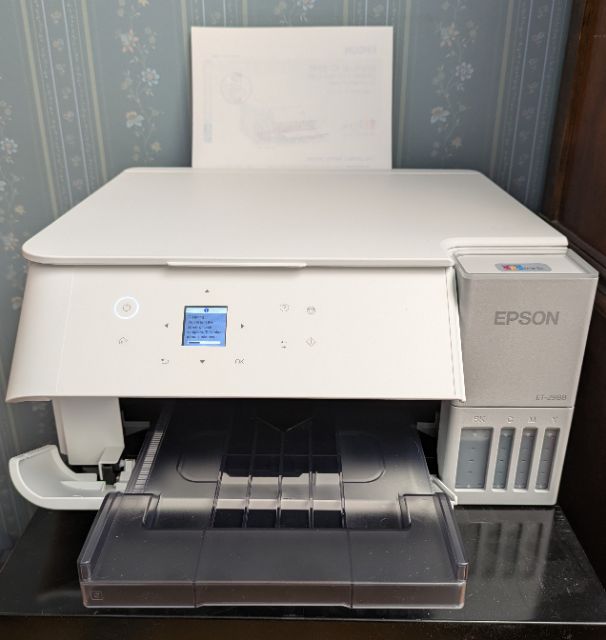
 I switched to Epson inkjet printers in 2004 partly because I was able to get refillable cartridges. Unfortunately, Epson has been making it difficult to use non-Epson cartridges. I had looked at the Epson EcoTank line but the price was high and the printers often lacked features that were available on even low-end WorkForce printers.
Recently Costco put their ET-2988 printer on sale for C$140 less than available elsewhere, although I noticed that other vendors reduced their prices from C$400 to C$300 a few weeks later. As far as I can tell, it is an ET-2980 with an extra bottle of black ink. Contrary to some reports, the printer was easy to setup using the Epson Smart Panel mobile phone app. The black ink comes in a 127ml bottle while the cyan/magenta/yellow ink comes in 70ml bottles. The bottles are keyed to the fill ports for the ink tanks - invert the bottles on the fill ports and they automatically fill the tanks, stopping when the tanks are full. It takes a while to charge the ink lines. An initial nozzle check showed issues with the magenta nozzles, but a cleaning operation resolved the issue.
The box claims the supplied ink can deliver 8,500 black pages and 6,500 colour pages after a normal fill - priming the system uses a fair about of ink. Costco currently sells a set of three colours and one black bottles for C$85, which should last me for years. I have been spending at least C$300 a year on WF-2960 cartridges. The ink bottles are also recyclable. I can easily monitor the actual ink capacity. The WorkForce printers would regularly nag me about "low ink" months before the cartridge(s) finally ran out, typically in the middle of a print job.
General print quality is excellent compared to my WF-2960 where verticals were sometimes ragged. Colour printing on photographic paper was equal to typical commercial photo printing, even before setting up a colour management (ICC) profile. My first test using a random sheet of photographic paper seemed to have small scratches, but these did not occur on 72lb/10mil paper. Print speed is acceptable, but then my print needs are typically light. The printer does not have an input paper tray - it accepts up to 100 sheets of plain paper vertically at the back. My WF-2960 had a larger capacity tray under the output tray that I would regularly forget to pull out after adding paper, causing printouts to hit the floor. I keep a supply of "good one side" paper if I am printing a single page - it is easy to add a sheet to the rear paper feeder. The ET-2980 output tray can be retracted - the printer will automatically open the flap and extend the output print tray before printing if necessary.
The display is quite small and interaction with the display is via buttons on the front panel - it took a bit of time to become familiar with the interface. The ET-2980 has a flatbed document scanner but does not have an Automatic Document Feeder (ADF). Although I have used an ADF scanner in the past, the results were rarely satisfactory due to uneven feed speeds 'stretching' text. I initially was not able to scan to my laptop - the instructions did not mention that I needed to install the Drivers and Utilities package from https://epson.ca/Support/Printers/All-In-Ones/ET-Series/Epson-ET-2980/s/SPT_C11CL41201.
Time will tell how well the printer will continue to perform, but based on preliminary results, I should have switched sooner!
2026/03/20 Observations
I enable double-sided printing by default. If I am printing a single page, I often slip a "good-one-side" sheet into the paper feeder. ET-2980 feeds the sheet, waits, retracts the sheet and prints on the other side, something I do not recall the previous printer did. I suspect the wait is because the printer thinks there is wet ink on the blank page.
If the ET-2980 is printing a job and I queue up another one, the driver pops up a "printer error". I would check the printer but it was working fine. However, as soon as the first job finishes printing, the second one starts and the error disappears.
Blog comments