 Once COVID-19 restrictions were over, my wife and I started travelling again. Reports of how Apple Air Tags helped travellers find lost baggage encouraged me to invest in Android alternatives, starting with two Tile trackers (https://www.tile.com/). Tiles use Bluetooth to communicate with phones running the Tile app which in turn communicates the location of the Tile to the Tile cloud and finally to the owner's Tile app. To test, I paired one Tile with my phone and the other with my wife's phone. We each took the other's Tile "out and about" and then tested if the phone that "owned" the Tile could locate the travelling Tile. Initial tests looked good, but then for several weeks, my phone could only locate my Tile when it was in Bluetooth range of my phone. The root cause was never resolved, reducing my confidence in the reliability of Tile trackers.
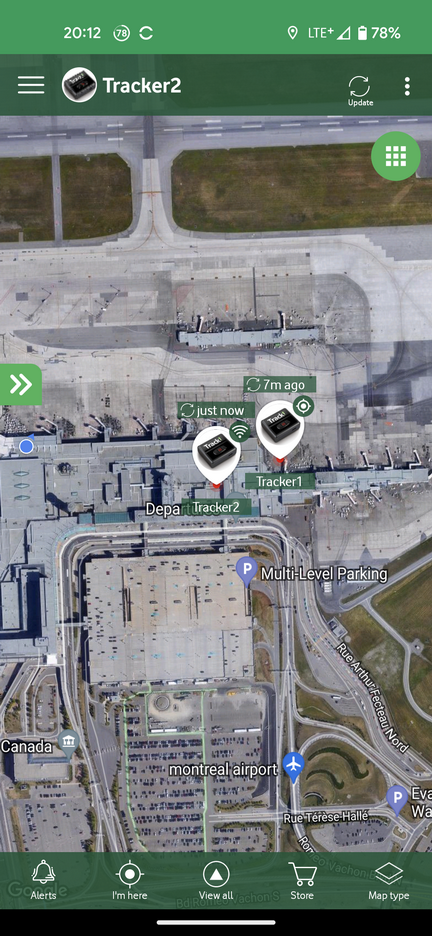
I then purchased two Tracki GPS trackers (https://tracki.com/). Rather than relying on crowd-sourced locations, Tracki's have GPS chips and cell capability which require a monthly subscription. When they worked, they performed well, providing regularly updated locations as shown in the image at the right. I could even see the path the Tracki's travelled. The Tracki's worked well on the trip to the cruise ship, but the batteries died on the way home. If a Tracki cannot establish a cell signal, such as when baggage is in the ship's hold on the night before departure or in the airplane's cargo hold, the battery runs down quickly. Tracki's support "Battery Saver Mode" where the Tracki goes to sleep for two to 24 hours, but further testing suggested that when the Tracki wakes up, it stays awake until it establishes a cell signal. Unfortunately, the Tracki appdoes not reliably indicate when the Tracki is in Battery Saver mode and when it will wake up next.
Based on my experiences described in Google: "Find My Device" Improvements, I purchased some Pebblebee Clips and Tags (https://pebblebee.com/) that are similar to Tile Trackers. Although Pebblebee has its own "Pebblebee" network, it also supports Google's Find My Device or Apple's Find My networks. They are small, have rechargeable batteries, Bluetooth range up to 300ft for the Tags and 500ft for the Clips, and a loud sound. Based on my limited experience, Pebblebee trackers seem to update more frequently and provide a more accurate location. Like the Tile trackers, they rely on other Android users being within Bluetooth range of the tracker, having an Internet connection, and getting a decent location fix (GPS, cell, or WiFi), but are not reliant on the Tile app that is properly installed (runs in background, precise location permissions at all times, unrestricted battery usage). Although I can see my wife's phone when I log into Find My Device in Guest Mode, her trackers do not show up. I solved this by using the Find My Device 'share' feature.
| Tile | Pebblebee | Tracki | |
| Operating Cost | free, Premium (I$30/year), Premium Plus (U$100/year) | Free | monthly from U$20 to U$30 per device |
| Network | Tile/Life360 | one of Google Find My Device, Apple Find My, Pebblebee | independent |
| Battery | replaceable | rechargeable | rechargeable |
| Battery Level Indicator | no | yes, via button on Clip/Tag | yes, via app |
| Bluetooth Range | 250-500 feet | 300-500 ft | not required |
| Location | crowd sourced via Tile/Life360 network | crowd sourced via selected network | independent |
| Location history | only with Premium | no | yes |
| Find My Phone from tracker | yes | yes, but requires many Pebblebee app permissions | no |
| Firmware updates | no | yes (Over the Air) | yes (Over the Air) |
| Alarm volume | medium | loud | none |
Blog comments