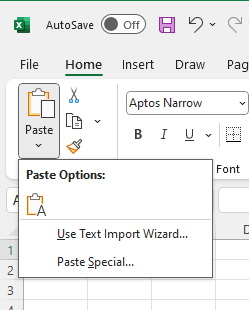
I often paste information into Excel and use Data -> Text to Columns so that I can manipulate the data. Sometimes I am working on sets of data that required different delimiters, such as spaces versus commas. Excel seems to 'remember' the delimiters used on one spreadsheet and automatically applies them when I paste data into a different spreadsheet. The only way I found that would get around this 'feechur' required closing all spreadsheets so that Excel would forget the earlier Text to Columns settings.
By luck, I noticed that there was a Paste -> User Text Import Wizard option. This allowed me to modify the current Text to Columns settings to match the data I was trying to import. A small step for productivity.
Blog comments