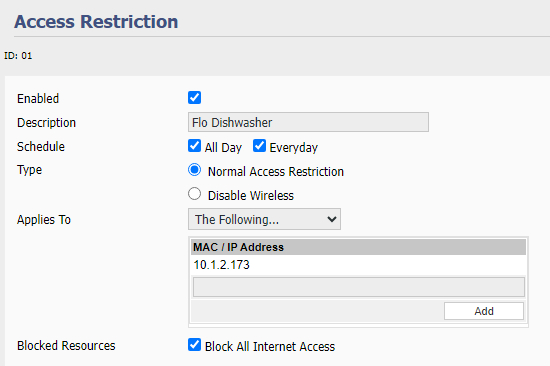
 A growing number of home devices rely on cloud services or "call home" via the Internet, which may be unnecessary and undesirable from a security perspective. The recommended method is to segregate these devices onto a separate network, usually through a Virtual LAN (VLAN) and firewall rules which can be complex to configure on some routers. An alternative approach is to block Internet access for specific devices. I described In Flo Operation in Offline Mode how I testing whether I would be protect from leaks if there was an Internet outage but did not go into any details.
I installed a number of WiFi security cameras that communicate with a Blue Iris server on my home network that I can access remotely via a VPN. Many security cameras connect to the manufacturer's cloud services so that they can be monitored via smartphone apps. Although convenient, there have been instances where cloud services have been hacked. Even if you do not sign up for cloud services, security cameras often connect to the Internet for reasons that are not always well communicated. My Amcrest camera turns on its spotlight when it detects motion. However, this feature stopped working if the camera lost its WiFi connection, suggesting that this functionality was cloud dependent.
I run Fresh Tomato software on my routers which includes an Access Restriction feature. I have not used "stock" router software for years, but a search suggests most have a similar capability, often under Parental Controls. I set up an Access Restriction rule similar to the one shown above, added my security cameras, and enabled the rule. All the cameras continued to send video streams to my home server. The Amcrest smartphone app could no longer connect to the Amcrest camera, preventing me from configuring the camera and watching the video feed via the app from home. Even though I never signed up for Amcrest cloud services, the app uses cloud services for all functions. I was surprised that the spotlight continued to function, contrary to my earlier assumption. The Reolink smartphone app communicates directly with the local IP address of the Reolink cameras, so the app is fully functional as long as I am home.
Blog comments